


Anyfans-Make Friends&Live
3.612.00 Reviews
App Specs
- Version
- 3.5.1
- Updated On
- License
- Free
- Downloads
- 500,000+
- Developer
- BCTO
- Categories
- Communication
- Platform
- Android
Screenshots
 Analysis by AppCompare
I approached Anyfans-Make Friends&Live as a communication app for people who want to meet others while watching live streams, rather than as a replacement for a private messenger. Its central idea is simple: browse live content, notice people who share your interests, and start conversations around what is happening in the moment. That makes the app feel more spontaneous than a conventional contact-based chat service.
My first impression is that it is aimed at users who enjoy open social discovery. You are not only messaging people you already know; you are stepping into a wider community where the live-streaming element gives conversations an immediate subject. That can make the first message easier, especially when a stream gives you something specific to react to instead of forcing you to begin with a blank “hello.”
The app is free to install, although it includes optional in-app purchases ranging from small amounts to considerably larger individual items. I would keep that in mind before spending time inside the social features. The free starting point makes it easy to test the atmosphere, but I would not treat paid items as necessary for deciding whether the community suits me.
What the first session feels like
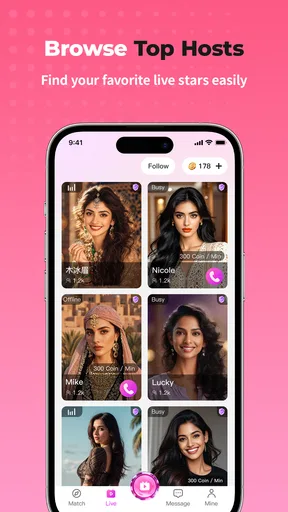
Anyfans-Make Friends&Live sits in the communication category, but its live-streaming focus changes the way I use it. A normal messaging app is usually built around people I already know. Here, the discovery process matters more: I can look for a stream, observe the room, and decide whether I actually want to participate. That extra step is useful for a first-time user who would rather understand the tone of a conversation before joining it.
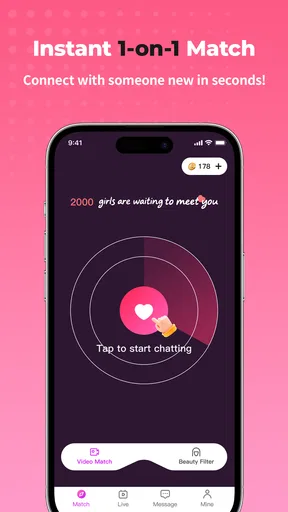
The store summary presents the experience in two parts: making friends and watching live streams. In practice, I would think of those as connected activities rather than separate tools. Watching gives me context, while social interaction is what turns that viewing session into a possible connection. If I only want silent video viewing, a dedicated streaming service may be more focused. If I want to meet new people through live interaction, this app has a clearer reason to exist.
The audience should also be approached with appropriate expectations. The content rating is Mature 17+, so I would not recommend treating this as a general family communication app or handing it to a younger teenager. Anyone joining public social spaces should be selective about what they share, who they continue talking with, and whether a conversation is becoming uncomfortable.
One useful mindset is to enter with a small goal instead of expecting instant friendship. My first meaningful success would not be collecting contacts. It would be finding one stream that feels comfortable, leaving a relevant comment, and seeing whether the conversation develops naturally. That approach reduces pressure and makes it easier to judge the app on the quality of interaction rather than on how quickly it produces attention.
Worth Reading Before You Choose

EA SPORTS FC Mobile 26 Is a Bigger Football Game, but It Takes Time

Flipboard Shows What News Apps Must Do Beyond the Feed

Switching to Android Auto Means Rethinking Your Driving Routine

Google Calendar Makes a Crowded Week Easier to Manage

Ludo King Makes the Most of the Minutes Between Plans

Baby Panda World Brings Quick Play to Modern Phones, but Its Game Library Feels Busy
Installing and preparing a sensible profile
The app comes from BCTO and supports devices running Android 6.0 or later. That broad compatibility makes it accessible to people using older Android hardware, although the experience can still depend on the phone’s available storage, connection quality, and ability to handle live content smoothly. I would install it when I have a stable connection and enough time to explore without rushing through the first screens.
During setup, I would keep my profile deliberately modest. A recognizable but non-sensitive display name is more useful than publishing a full name, workplace, school, location, or daily routine. The goal is to make it possible for other users to remember me without giving strangers information they do not need. This is especially important in a communication app built around meeting people outside my existing contacts.
I would also decide in advance how much attention I want to give the app. Live social services can encourage long, unplanned sessions because there is always another room or conversation to inspect. Setting a personal limit before browsing helps me use the app intentionally rather than drifting through streams while neglecting other tasks.
A practical setup routine is to spend the first few minutes observing the interface and the style of the community. I would avoid immediately purchasing anything, sharing personal contact details, or moving a conversation elsewhere. First I would learn how public interactions work, how people address one another, and whether the overall tone matches what I am looking for.
How to reach the first useful interaction
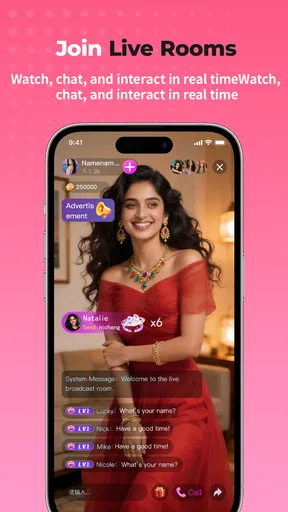
For a newcomer, the easiest path to success is to choose a live stream with a topic or mood that genuinely interests me. A specific reaction is more natural than a generic introduction. Mentioning something that is currently happening gives the host or other viewers a clear way to respond, and it helps distinguish a real contribution from a message that could have been posted anywhere.
I would watch briefly before writing. That small pause helps me understand whether the room welcomes questions, prefers fast-moving comments, or is focused mainly on the host. It also prevents me from repeating something that was just discussed. In a live environment, timing matters more than producing a perfect message.
Once I have made one relevant comment, I would wait and see what happens rather than sending several follow-ups. If someone answers thoughtfully, I can continue with a short question connected to the stream. If the room moves on, I would not interpret that as a personal rejection. Live chats are often quick, and a missed response may simply reflect the pace of the conversation.
The first successful action can therefore be very small: join a suitable stream, contribute once, and identify one person whose communication style feels respectful. That is a better foundation than trying to contact many people at once. It also gives me enough evidence to decide whether the app’s social rhythm works for me.
For someone who is shy, I would use the viewing phase as a low-pressure introduction. I can learn the names or styles of regular participants, notice which conversations are constructive, and wait until I have something genuine to add. This is one of the app’s stronger ideas compared with a blank-profile chat service, where the user has to create a conversation without any shared context.
Where the experience differs from ordinary messaging
The main alternative is a familiar messenger used with friends, family, or existing groups. Those apps are usually better for reliable private communication, planned conversations, file exchange, and keeping in touch with people I already trust. Anyfans-Make Friends&Live is more suitable when I want discovery and live social energy. It is less predictable, but that unpredictability is also what can make a new interaction feel fresh.
It also differs from a dedicated live-video platform. A streaming-first service may offer a more refined viewing experience or a larger focus on broadcasters, while this app’s appeal is the connection between watching and meeting people. I would choose the alternative when video quality, creator tools, or a deep content library matter most. I would choose Anyfans when the social possibility is at least as important as the stream itself.
Compared with random chat services, the live-stream setting gives me more context before I engage. That is a meaningful advantage because I can observe a public interaction rather than entering a completely empty conversation. Still, context is not the same as trust. I would treat every new contact cautiously and avoid assuming that a friendly public exchange tells me everything about a person.
Common points of confusion for new users
One likely confusion is expecting every stream to lead directly to a private friendship. The app can create opportunities, but it cannot guarantee compatibility or a response. Some sessions may be enjoyable only as viewing experiences, and that is still a valid use. I would not judge the entire service by one quiet room or one conversation that ends quickly.
Another point is the difference between a public interaction and a personal relationship. A user who is warm in a live room may not want continued messages, and a short reply is not necessarily an invitation to move the conversation elsewhere. I would look for mutual effort over time. If I am always initiating and receiving minimal responses, I would step back instead of pushing harder.
The Mature 17+ rating is another reason to use discretion. I would not assume that every conversation is appropriate for every audience, and I would be careful when viewing streams in shared spaces. For younger users, families, or anyone seeking a tightly controlled environment, a mainstream private messenger with known contacts is likely the safer fit.
Paid items can also create uncertainty. Since the app is free but offers in-app purchases, I would explore the basic experience before considering any optional spending. A simple rule works well: if I cannot explain what an item adds to my experience and why I want it, I would not buy it. This keeps the decision tied to actual use rather than to pressure created by a fast-moving social setting.
I would also avoid sharing a phone number, home address, financial information, private photographs, or account credentials with someone I have just met. If a conversation becomes demanding, manipulative, or uncomfortable, ending it is a sensible choice. The ability to meet new people is valuable only when I keep control over the pace and amount of personal information involved.
Small habits that make the app more useful
My first practical tip is to separate browsing from socializing. I would spend one short session discovering which streams fit my interests, then return later with the intention of participating. This prevents me from treating every room as a commitment and makes it easier to remember where I actually felt comfortable.
Second, I would use questions that invite a real answer rather than attention-seeking messages. Asking about the topic being discussed, the reason behind a recommendation, or what the host plans to cover next gives the conversation somewhere to go. It also reveals whether the other person enjoys an exchange or only wants quick reactions.
Third, I would judge connections by consistency and respect, not by speed. A person who replies slowly but communicates thoughtfully may be a better match than someone who immediately demands constant attention. This is an important trade-off in live social apps: fast interaction feels exciting, but slower interaction can be easier to manage and more meaningful.
Fourth, I would keep my public profile broad enough to attract conversation without turning it into a personal biography. Mentioning general interests can help the right people start a discussion, while leaving out identifying details protects my privacy. That balance is particularly useful here because the app is designed around meeting people beyond my established circle.
Finally, I would review my spending choices after a few sessions rather than making them during an exciting live moment. Optional purchases can be tempting when I feel involved in a room, but waiting gives me a clearer view of whether I genuinely enjoy the app or simply reacted to the atmosphere of one stream.
Who will enjoy it, and who should choose something else
I think the app is a good match for adults who enjoy live social spaces, like discovering unfamiliar people, and are comfortable initiating light conversation. It is especially appealing to someone who finds traditional friend-finding apps too static. The live setting supplies a shared moment, which can make introductions feel less artificial.
It may also suit users who want a flexible way to spend a few minutes meeting people without arranging a formal group or joining a long-term community. I can browse, participate briefly, and leave without needing to maintain a permanent conversation. That low-commitment structure is useful when I want social contact but do not have the time or energy for a lengthy chat.
I would skip it if my main need is dependable private messaging with people I already know. A conventional messenger will usually be more direct for family updates, work coordination, or sensitive conversations. I would also look elsewhere if I want a carefully curated viewing service, advanced broadcasting controls, or a platform where content discovery is more important than personal interaction.
People who dislike public social uncertainty may find the experience tiring. The quality of a session can depend on who is present, how quickly the conversation moves, and whether the atmosphere feels welcoming. That variability is not a defect that can be removed without changing the app’s character, but it does mean I would approach it with realistic expectations.
Performance expectations and current position
The current version is 3.5.1, and the app has been available since November 1, 2021. Its reach is substantial, with over 500 thousand installs, while its average rating is 3.6 from around 700 ratings. I read those figures as a sign that there is an established audience, but not as proof that every user will have the same experience. A social app can feel excellent in one community and unappealing in another.
Those numbers also suggest that I would give the app a fair trial rather than dismissing it after a single session. At the same time, I would not confuse popularity with personal fit. The most useful test is whether I can find a stream I enjoy, participate without feeling pressured, and have at least one respectful exchange.
On an older supported Android phone, I would pay attention to how comfortably live content runs and whether multitasking feels practical. I would close other demanding apps if necessary and use a stable connection. These are ordinary precautions for live communication, but they matter more here than they would in a text-only messenger because the experience depends on timely interaction.
My recommendation after using it
The best way to try Anyfans-Make Friends&Live is to treat the first session as a guided test, not a race to make contacts. Set up a privacy-conscious profile, watch before speaking, choose one stream that genuinely interests you, and make one relevant contribution. If the response feels natural, continue slowly. If the room feels uncomfortable or the conversations do not suit you, leaving is a reasonable result rather than a failure.
I like the way the app gives a first message some context. Watching a live stream can make meeting people feel less forced than opening a completely empty chat window, and the combination of viewing and conversation creates a distinctive communication experience. The trade-off is that public social spaces require more judgment than a private contact list, especially with a Mature 17+ audience and optional purchases in the environment.
For adults who want spontaneous interaction and are willing to manage their privacy, Anyfans-Make Friends&Live is worth exploring at no cost before deciding whether it belongs in their routine. I would recommend it to a friend who enjoys live communities and understands that meaningful connections take time. I would not recommend it as a universal messenger, a family-safe platform, or a substitute for a focused streaming service.
My final advice is simple: look for quality rather than quantity. One respectful conversation connected to a stream you actually enjoyed is a stronger sign that the app works for you than a long list of brief contacts. Used that way, the app feels more purposeful, and you can decide with a clear head whether its live social format deserves a regular place on your phone.
Pros
- Live streams make it easy to interact with creators in real time.
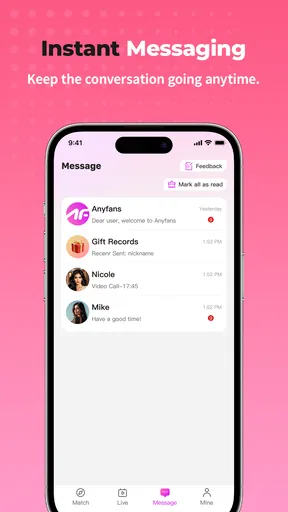
- Private messaging supports more personal conversations.
- The app offers a broad range of entertainment and social content.
- Profiles and interests help users discover potentially compatible people.
- Regular engagement can make the community feel active and dynamic.
Cons
- Some content or interactions may require in-app purchases.
- Live-stream quality can vary depending on the creator’s connection.
- The large user base may include inactive or low-effort profiles.
- Privacy settings should be checked carefully before sharing personal details.
- Frequent notifications may become distracting without customization.
FAQs for Anyfans-Make Friends&Live
What is Anyfans-Make Friends&Live, and what can I do with it?
Anyfans-Make Friends&Live is a social live-streaming app focused on meeting people, watching live broadcasts, and interacting with creators or other users in real time. After creating a profile, you can browse live rooms, send messages, follow interesting hosts, and potentially participate in video or audio conversations. The available features may vary by region, account level, and app version.
Is Anyfans-Make Friends&Live free to download and use?
The application may be free to download, but some features can involve optional in-app purchases. Live-streaming platforms commonly offer virtual gifts, coins, premium interactions, subscriptions, or other paid services. Before confirming a purchase, review the displayed price and payment details carefully. Parents should also check device restrictions, since social apps with virtual currency may not be suitable for unsupervised younger users.
Is Anyfans-Make Friends&Live safe for meeting and chatting with strangers?
As with any live social platform, users should be careful when communicating with people they do not know. Avoid sharing your address, phone number, passwords, financial information, private photographs, or other identifying details. Use the app’s blocking and reporting tools if someone behaves abusively or requests inappropriate content. It is also wise to review privacy settings and remember that live interactions can change quickly.
Does Anyfans-Make Friends&Live require a camera, microphone, or personal information?
You may be able to browse some content without enabling every permission, but features such as live broadcasting, video calls, voice chats, or uploading profile content can require access to the camera, microphone, photos, or notifications. The app may also request account information for registration. Grant only permissions that are necessary for the features you intend to use, and check your phone’s permission settings whenever you change how you use the app.
What should I know about moderation, privacy, and inappropriate content?
User-generated live content can include conversations or broadcasts that are unpredictable, and moderation may not prevent every unwanted interaction from appearing immediately. Read the platform’s community rules and privacy policy before creating an account. Report suspicious, offensive, or illegal behavior through the available tools, and do not engage with users requesting money or personal information. Availability of moderation features and content controls may differ between Android, iOS, and regions.


